
Dutch Design · Pure sine wave · Portable · Solar charging
Powerstation for laptop and remote work: your own power anywhere
Work wherever you want, without looking for a wall outlet. With a powerstation for your laptop, you bring your own portable power supply to any location.
Use your laptop, phone, monitor, Wi-Fi router, camera or measuring equipment from a garden, camper, temporary workspace or remote project site. A Mobisun powerstation delivers direct power via 230V, USB-C, USB-A and 12V, and recharges via grid or solar energy.
This is how you build a reliable mobile workspace anywhere — quiet, without fuel and without a fixed installation.
Charge your laptop without a wall outlet? Work anywhere
Remote work is more than working from home. Perhaps you regularly work:
- from a motorhome or caravan;
- in a garden or on a terrace;
- from a temporary project site;
- on a construction site or at an event;
- during field research;
- from a holiday home or cabin;
- in locations where there is no electricity connection yet;
- on the road as a photographer, consultant or service technician.
You can usually arrange internet via a mobile hotspot, 4G or 5G router or Starlink. But without power, your laptop, router and other devices will eventually stop anyway.
A Mobisun works as a portable outlet with battery. Charge the system in advance and connect your equipment directly. With a matching solar panel, you replenish the energy supply while working.
What equipment can you connect to a powerstation?
Depending on the model and total consumption, you use a Mobisun for:
- laptops and notebooks;
- smartphones and tablets;
- a second monitor;
- mobile Wi-Fi routers and 4G/5G equipment;
- Starlink Mini;
- LED lighting;
- cameras, drones and battery chargers;
- walkie-talkies;
- measuring and test equipment;
- low-power printers and scanners;
- security cameras;
- audio equipment;
- power tool batteries;
- other equipment within the maximum power rating.
A powerstation supplies electricity, but does not provide the internet connection itself. For full remote work, you also need a mobile or satellite connection.
Why a Mobisun powerstation for remote work?
A mobile outlet anywhere
Connect your laptop adapter or other equipment to the 230V outlet. With certain models, compatible laptops can also be charged directly via USB-C Power Delivery.
No generator noise
A powerstation has no combustion engine. Join video calls quietly, make audio recordings or work with focus without disturbing engine noise.
No fuel or exhaust gases
You do not carry petrol or diesel, and the system produces no local exhaust gases during use.
Safe for sensitive electronics
Mobisun powerstations deliver pure sine wave power. This is important for laptops, monitors, communication equipment and other sensitive electronics.
Charge your laptop with solar energy
With a folding solar panel, you top up the powerstation during the day. This extends the time you work without the grid.
No fixed installation
A Mobisun is ready to use and easy to move between locations, vehicles and projects. No fixed inverter or built-in battery is required.
Which powerstation suits your mobile workspace?
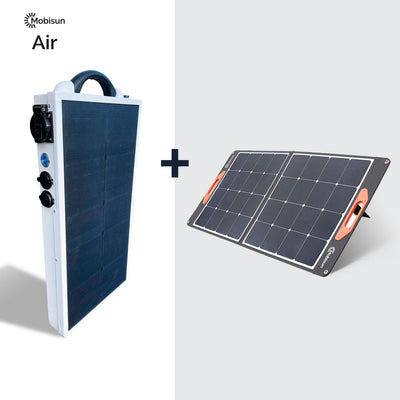
Mobisun Pro Air with 60W solar panel – for laptop and basic equipment
154Wh LiFePO₄ · 300W continuous · 600W peak · USB-C PD 60WSuitable for:
- one laptop;
- phone and tablet;
- mobile hotspot or small router;
- camera and battery chargers;
- LED lighting;
- short workdays or meetings;
- employees who want to carry little weight.
Mobisun Pro Classic with 100W solar panel – for a longer workday
259Wh · 300W continuous · 500W peakSuitable for:
- a full workday with a laptop;
- multiple phones and tablets;
- laptop, router and lighting;
- audiovisual equipment;
- camera and drone batteries;
- mobile office in a camper or service vehicle;
- fieldwork and temporary project sites.
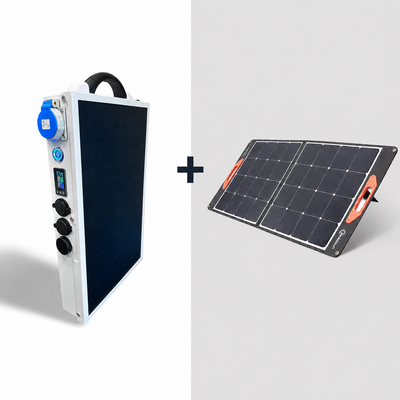
Mobisun Pro Air 2.0 with 100W solar panel – for professional remote work
308Wh LiFePO₄ · 500W continuous · 1000W peak · 2× USB-C PD 100W · IP67Suitable for:
- two USB-C devices at once;
- powerful business laptops;
- laptop, router and monitor;
- Starlink Mini;
- photography and video production;
- inspections and technical fieldwork;
- changing weather conditions;
- professional daily use;
- organisations that value repairability.
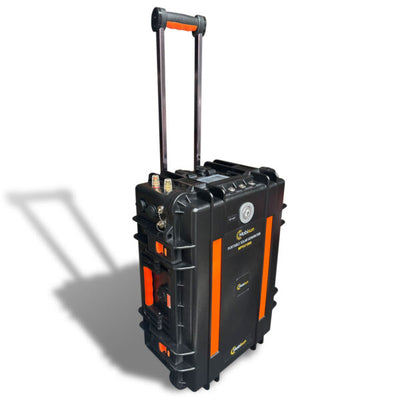
Portable Solar Generator 3000Wh – a complete mobile office
3000Wh · 1800W continuous · 3600W peak · wheeledSuitable for:
- multiple laptops and monitors;
- network and communication equipment;
- printers and audiovisual equipment;
- temporary project offices;
- photo and film productions;
- research projects;
- construction and inspection sites;
- long-term work without an electricity connection.
Custom business quote
Our specialists are happy to advise on the right configuration for your work situation — from individual powerstations to complete bundles with solar panels.
Compare powerstations for remote work
| Model | Capacity | Continuous power | Laptop connection | Best use |
|---|---|---|---|---|
| Pro Air | 154Wh | 300W | USB-C 60W or 230V | Light mobile work and short workdays |
| Pro Classic | 259Wh | 300W | 230V, USB-C 45W via solar panel | Longer workday and multiple devices |
| Pro Air 2.0 | 308Wh | 500W | 2× USB-C 100W or 230V | Professional and intensive use |
| Portable Solar Generator | 3000Wh | 1800W | 230V | Complete mobile office and project sites |
Do not choose on battery capacity alone. Also check:
- the maximum power of your equipment;
- the charging power of your laptop adapter;
- how many devices you want to connect at once;
- how many hours you want to work without grid power;
- whether you can top up with a solar panel during the day.
How long can you use a laptop with a powerstation?
Usage time depends on the actual power consumption of the laptop — and this changes during use. Video editing, heavy software, maximum screen brightness and video calls use more energy than word processing or email.
For a first estimate, use this formula:
The 0.85 factor compensates for the energy loss of the 230V inverter.
Indicative example at 60W continuous consumption
| Powerstation | Estimated usable capacity | Extra work time at 60W |
|---|---|---|
| Pro Air | approximately 131Wh | approximately 2.2 hours |
| Pro Classic | approximately 220Wh | approximately 3.7 hours |
| Pro Air 2.0 | approximately 262Wh | approximately 4.4 hours |
| Portable Solar Generator | approximately 2550Wh | approximately 42 hours |
This is the extra work time from the powerstation and is independent of the laptop’s own battery.
A laptop charged directly via USB-C is often more efficient in practice than a laptop on the 230V adapter. Actual usage time remains dependent on the device, load, temperature, battery status and other connected equipment.
How to calculate the energy consumption of your complete workspace
Add up the consumption of all devices.
Example: basic mobile workspace
- laptop adapter: 65W;
- mobile router: 8W;
- LED lamp: 7W.
Total maximum power: 80W
With a Pro Air 2.0, this gives as a theoretical indication:
The laptop's own battery adds a few more hours. If the laptop does not continuously demand the maximum charging power, the actual usage time is longer.
Example: extended workspace
- laptop: 65W;
- second monitor: 25W;
- router: 8W;
- phone charger: 10W;
- LED lighting: 7W.
Total maximum power: 115W
For one full workday without solar yield, you will need a larger battery, or you will need to top up the system in between.
So do not just look at the power of your laptop adapter. A 100W adapter does not automatically use 100W continuously, but indicates how much power it can deliver at maximum.
Charging a laptop with a solar panel
A powerstation contains a fixed amount of stored energy. By adding a solar panel, you generate new energy during the workday.
Combine the Pro Air with a folding 60W panel. A 100W panel is available for the Pro Classic and Pro Air 2.0. The Mobisun panels also have USB-A and USB-C outputs, so you can also charge compatible devices directly via the solar panel.
This is how you get the highest yield:
- place the panel fully unfolded;
- avoid shade from trees, buildings or vehicles;
- aim the panel as directly as possible at the sun;
- adjust the tilt angle during the day;
- keep cables and connections clear and dry;
- preferably place your laptop in the shade;
- place the solar panel in direct sunlight.
Actual yield varies with cloud cover, season, temperature, positioning and the number of effective sun hours.
☀️ Internal solar panel: always charging in the sun
The Mobisun Pro Air and Pro Classic feature a built-in 29-watt solar panel. The Pro Air 2.0 has an integrated 23-watt solar panel. The built-in panel always charges the battery as soon as sunlight hits it — the device does not need to be turned on. For even more capacity, combine the system with a folding 60W or 100W solar panel.
Charge the laptop via USB-C or via the 230V outlet?
Directly via USB-C
Charging via USB-C is compact and efficient: you do not need a separate 230V adapter. Conditions:
- your laptop supports USB-C Power Delivery;
- the offered wattage is sufficient;
- you use a suitable USB-C cable.
The Pro Air delivers up to 60W via USB-C. The Pro Air 2.0 has two USB-C PD ports, each up to 100W.
Via the original laptop adapter
Does your laptop not support USB-C or does it need more power? Then use the original adapter via the 230V outlet. Check that the total power of all connected devices remains below the continuous output power of the powerstation.
Reliable internet at your remote workspace
For professional remote work, both power and internet are essential. Possible internet connections:
- hotspot via your smartphone;
- portable 4G or 5G router;
- fixed router at a temporary location;
- external antenna or PoE connection;
- Starlink Mini at remote locations.
Place a mobile router in a location with good coverage and, where possible, use an efficient USB or 12V connection. This avoids unnecessary conversion losses via 230V.
Before an important workday, also check mobile network coverage, your data bundle and roaming, VPN access, the speed for video calls and a second internet connection as backup.
Who benefits from a mobile power supply?
Digital nomads and self-employed entrepreneurs
Work from a camper, cabin, boat, garden or holiday address without constantly looking for a wall outlet.
Photographers and videographers
Charge laptops, cameras, drones, lighting, monitors and other production equipment on location.
Engineers and researchers
Power measuring equipment, data loggers, laptops and communication equipment during inspections and field research.
Construction and service technicians
Set up a mobile administrative workspace immediately at a new or temporary location, even before the grid connection is available.
Security and monitoring
Power laptops, routers, cameras, antennas and temporary security equipment at remote locations.
Events and media productions
Use quiet power for registration, ticketing, audio, photography, communication and production equipment.
Work smarter and longer on battery power
Lower the screen brightness
A very bright screen requires extra energy. Adjust the brightness to what is actually needed.
Use USB-C and 12V where possible
By powering devices directly via USB or 12V, you avoid conversion losses via the 230V outlet.
Switch off unused equipment
A second screen, printer, router or adapter still uses energy at idle.
Download files in advance
Local files and offline work prevent an unstable internet connection from interrupting your workday.
Charge during the best sun hours
Use the hours around midday to generate as much energy as possible.
Test your mobile office in advance
Connect all devices at home at the same time once, check the maximum consumption and measure how long the system actually lasts.
Working from home during a power cut
A Mobisun is not only suitable for on the go. Use the powerstation as a temporary backup for your home workspace. During a power cut, you can:
- keep using the laptop;
- charge the phone;
- power the Wi-Fi router or a mobile hotspot;
- connect LED lighting;
- save and send important files.
Pass-through charging means you use equipment while the powerstation itself charges. This is not the same as a UPS with guaranteed uninterrupted switchover. For servers and systems that may not experience even a brief power interruption, use a certified UPS solution.
Frequently asked questions about powerstations for laptops
Which powerstation do I need for my laptop?
For one efficient laptop and a phone, the Pro Air (154Wh) is usually sufficient. For a longer workday or multiple devices, the Pro Classic (259Wh) offers more capacity. The Pro Air 2.0 (308Wh, 2× USB-C 100W) is the best choice for more powerful laptops and professional use. For multiple complete workspaces, the Portable Solar Generator 3000Wh is more suitable.
Can I connect any laptop?
Yes, almost any laptop with a standard 230V adapter can be connected, as long as the power is within the powerstation’s specifications. Direct charging via USB-C is only possible when the laptop supports USB-C Power Delivery and the offered power is sufficient.
Can I charge my laptop directly via USB-C?
Yes, for compatible laptops. The Pro Air has USB-C PD up to 60W. The Pro Air 2.0 has two USB-C PD ports of up to 100W each. Check which voltage and wattage your laptop needs.
How many times can I charge my laptop with a powerstation?
Divide the practically usable capacity of the powerstation by the capacity of your laptop battery. A Pro Air has approximately 131Wh usable via 230V; with a 60Wh laptop battery, this theoretically amounts to just over two full charges.
Can I use a monitor and laptop at the same time?
Yes, as long as the combined power remains below the maximum continuous power. Calculate in advance how long the battery capacity will last at this total consumption.
Can a Mobisun power a Starlink Mini?
Yes, when the requested power and connection are within specifications. For the combination of Starlink, laptop and other equipment, the Pro Air 2.0 offers more capacity and connectivity than the Pro Air.
Can I work while the solar panel charges the battery?
Yes. The Mobisun Pro Air, Pro Classic and Pro Air 2.0 support pass-through charging: you use connected equipment while the system is charged by the solar panel or another power source.
Is a powerstation the same as a laptop power bank?
No. A laptop power bank usually only has USB outputs. A powerstation has a larger battery capacity and also offers connections such as 230V and 12V, so you can also power routers, monitors, lighting and other equipment.
Can I use a desktop computer on a powerstation?
Yes, when the total consumption of computer, monitor and peripherals remains within the continuous power. A desktop setup usually requires more energy than a laptop; for long-term use, a larger capacity is therefore needed.
Is the Pro Air 2.0 suitable for outdoor work?
Yes. The Pro Air 2.0 is IP67-rated and therefore dustproof and waterproof. However, keep laptop adapters, cable connections and other connected equipment protected against rain and moisture.
Work anywhere with your own energy
A fixed workspace is no longer necessary. With a Mobisun powerstation, you bring reliable power for your laptop, internet connection, phone and professional equipment.
Choose the compact Pro Air for light mobile work, the Pro Classic for more usage time, the Pro Air 2.0 for professional remote work or the Portable Solar Generator for a fully mobile project office.